User story splitting means turning one big story into several smaller ones, each of which still gives a user something they can try. “As a client, I can book, pay for and manage appointments” is too big to build, test or price with confidence. “As a client, I can book an appointment for a fixed time slot” is not.
For a founder or product owner, splitting is a way to control cost. Every small story can be ordered, built, shown and dropped on its own. A big story has to be built and paid for in one piece, and you see whether it works only at the end.
Why do we need to split user stories?
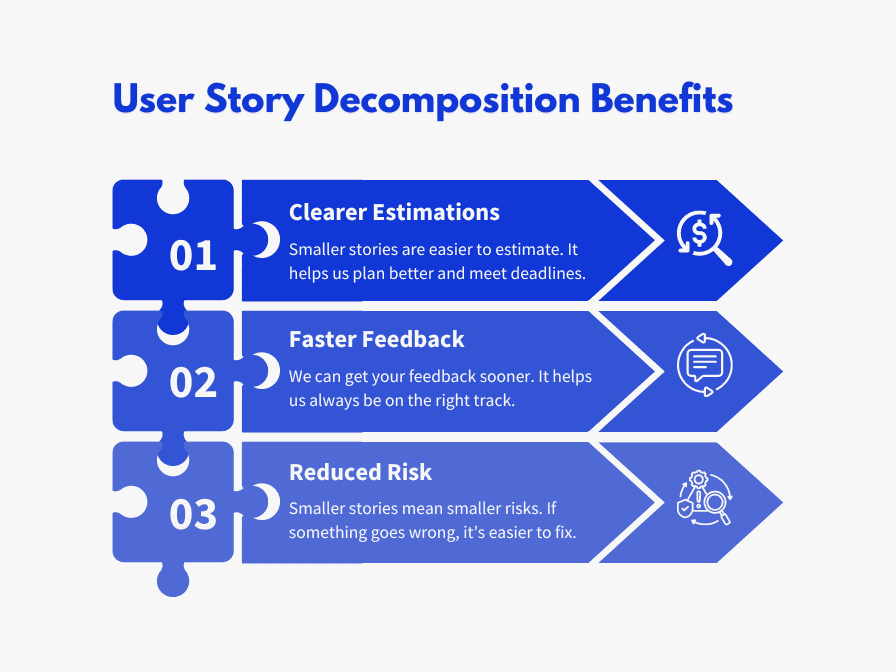
Smaller stories pay off in five ways:
Better estimates. A team can size a small, clear story much more reliably than a large, vague one.
Faster feedback. A small story reaches you at the next Sprint Review instead of three Sprints later.
Less risk. If a small story goes wrong, you lose days, not weeks.
More choice. When a story splits into pieces of different value, you can drop the low-value piece.
Steady progress. A team that finishes stories every few days shows progress you can check and spots trouble early.
Small batches matter more when a team uses AI coding tools. The 2025 DORA report found that AI adoption now goes with higher delivery throughput but still has a negative relationship with software delivery stability. DORA’s AI Capabilities Model from September 2025 found that working in small batches “amplifies the positive influence of AI on product performance and reduces friction for development teams.” And unclear requirements are still the top complaint on the developers’ side: in the Stack Overflow Developer Survey 2026, 16.6% of 18,214 developers named unclear priorities or requirements as the factor that did most to make their job harder. A big story usually hides several unclear requirements. Splitting forces them into the open.
Independent: it can be built and ordered without waiting for another story.
Negotiable: the details are worked out with the team, not fixed like a contract.
Valuable: it matters to a user or customer, not only to developers.
Estimable: the team understands it well enough to size it.
Small: Wake put the limit at “at most a few person-weeks worth of work”; the Agile Alliance glossary says small enough to fit within an iteration.
Testable: you can write a test that shows when it is done.
Splitting a story by technical layer (one story for the screen, one for the database, one for the API) makes each piece small, but it breaks Independent and Valuable: no user can try a database table.
Split vertically
We aim for vertical slices. Each slice is a complete piece of a feature that runs from the screen down to the database. Think of slicing a cake from top to bottom, so each slice has every layer, instead of serving the frosting first and the sponge later.
How small should a story be?
In our teams we aim for 6 to 10 stories per Sprint, depending on the team’s pace. Before Sprint Planning, agree on the size that triggers a split. For most teams that is 8 or 13 story points; on some projects we split at 5. If your team doesn’t use points yet, our guide to story points explains them.
User story splitting patterns
Richard Lawrence and Peter Green describe nine splitting patterns in the Humanizing Work Guide to Splitting User Stories. Here they are with examples from a booking app, where clients book and pay for appointments with independent providers.
Pattern
Big story
Split into
Workflow steps
As a client, I can book an appointment
Book a free slot · then book with a deposit · then book with provider approval · then reschedule
Operations
As a client, I can manage my bookings
View bookings · cancel a booking · reschedule a booking
Business rule variations
As a provider, I can set a cancellation policy
Free cancellation up to 24 hours before · keep the deposit after that · charge a no-show fee
Variations in data
As a client, I can find providers near me
Search by city · then by neighbourhood · then by distance on a map
Data entry methods
As a client, I can pick a date
Choose from a list of the next 14 days · then a full calendar picker
Major effort
As a client, I can pay by card, Apple Pay or Google Pay
Pay by card, which builds the payment flow · then add the other methods
Simple/complex
As a client, I can search providers
Search by name · then filter by service, price and availability
Defer performance
As a client, search results appear instantly
Search works, with a loading state · then results in under 2 seconds
Break out a spike
As a provider, I get paid out after each booking
A time-boxed check of how the payment provider handles deposits and payouts · then build payouts
Nine user story splitting patterns with booking-app examples
A few notes on using them:
Workflow steps: build the simplest path through the whole flow first, then add the steps in between. A booking with no deposit and no approval is still a booking a user can try.
Major effort: when the first variant carries most of the work, don’t split into equal-looking stories. Make “the first payment method” one story and “the rest” another.
Break out a spike: the guide puts this last on purpose, calling it “your last resort.” Try the other eight first. When you do use a spike, give it one question to answer and a time limit.
Which split should you choose?
Often a story can be split two or three ways. The Humanizing Work guide gives two rules for choosing:
“Choose the split that lets you deprioritize or throw away a story.” If one half is clearly less important, you just found something you might not need to build.
“Choose the split that gets you more equally sized small stories.” An 8-point story split into four 2-point stories gives the product owner more room to reorder than a split into 5 and 3.
Splitting pays off most before you have paid for anything. Our project estimate turns your brief into user stories. You confirm what is in scope, and every hour in the budget traces back to a story you kept. Uncheck a story and its hours come off. We check the hours the model suggests against what our team actually books on finished projects, then multiply by our published rate of $39-55 an hour.
Here is an example run of our estimate’s math with sample inputs: a dating app for iPhone and Android with profiles, matching, chat and subscriptions. The work items are assumptions. Only the arithmetic is ours.
Phase
Work in the sample
Hours
Discovery and UX
Onboarding and matching flows, wireframes
18
Design
UI kit and key screens
22
Frontend
Mobile app (profiles, swipe, chat) and moderation panel
62
Backend
Profiles, matching and chat API; moderation and reports
54
Integrations
In-app purchases and push notifications
12
QA
Test plan and regression
24
Release
App store release
8
Total
200 hours, a budget of $6,600-13,600, about 5 weeks
Example run of our estimate’s math: dating app (inputs are assumptions)
It’s a planning range, not a fixed quote. If the moderation panel can wait for a second release, that is a story you can uncheck before the build starts, not a change request after. You can see what your idea costs to build and try it on your own stories.
Real projects split the same way. On Traza, a booking app for tattoo artists, the artist side came to 9 epics and about 22 user stories. When the custom calendar grew bigger than planned, we cut it to a first version and moved push notifications and booking creation forward, because artists needed those more.
What we would do
Write the product as a short list of big stories, one per thing a user must be able to do.
Split each one with the nine patterns until it fits comfortably in a Sprint, keeping every piece vertical.
Check each piece against INVEST, especially Independent and Valuable.
Pick the split that exposes a piece you could drop, then drop it from the first release.
Keep the first release to one main job. That is how our MVP development gets a first version live in 2-4 weeks for $5,000-15,000.
Have a product idea that needs fast market validation? We can help! Talk to our experts to get a free project estimation.
FAQ
What is user story splitting?
User story splitting is breaking a large user story into smaller stories that each still deliver something a user can try. Smaller stories are easier to estimate, build, test and reorder, and they let you drop the parts you don’t need.
What are the common user story splitting patterns?
The Humanizing Work guide by Richard Lawrence and Peter Green lists nine: workflow steps, operations, business rule variations, variations in data, data entry methods, major effort, simple/complex, defer performance and break out a spike.
How small should a user story be?
Small enough that several fit in one Sprint. In our teams we aim for 6 to 10 stories per Sprint, and anything sized at 8 or 13 points or more gets split before Sprint Planning.
What is a vertical slice in user stories?
A vertical slice is a story that cuts through every layer a user needs, from the screen to the database, so the user can try it on its own. Splitting by layer, such as a separate database story, breaks the Independent and Valuable parts of INVEST.
When should you use a spike?
Only as a last resort, when the team doesn’t know enough to split or build a story. Give the spike one question to answer and a time limit, then split or build the story with what you learned.
The best of our blog, bi-weekly
Carefully curated content for resourceful Devs, CTOs, and PMs. No spam.